Best Free Software Tools for Students and Professionals
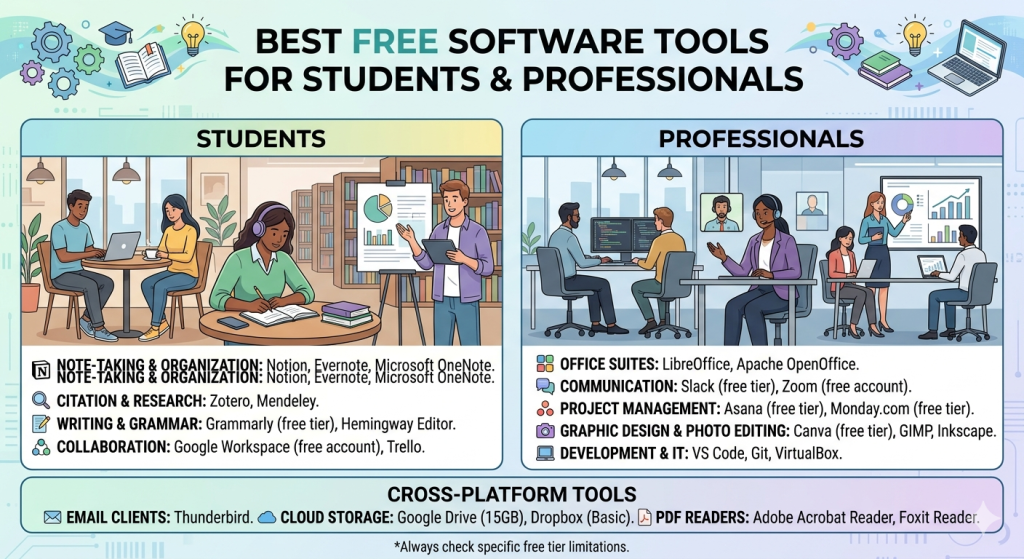
In today’s digital world, having access to the right tools can significantly boost productivity, efficiency, and overall performance. Whether you’re a student trying to manage assignments or a professional handling complex tasks, free software tools can help you achieve more without spending money. This guide explores the best free software tools for students and professionals, covering productivity, communication, design, and more.
Why Free Software Tools Matter
Free tools are not just about saving money, they also provide accessibility and flexibility. Many of these tools offer features comparable to premium software, making them ideal for students on a budget and professionals seeking cost-effective solutions. Learn more
Benefits include:
- Cost savings
- Ease of access
- Cross-platform compatibility
- Regular updates and improvements
1. Productivity Tools
Microsoft Office Online
This free web-based version includes Word, Excel, and PowerPoint. It allows users to create, edit, and share documents in real time.
Key Features:
- Cloud storage integration
- Collaboration in real time
- Familiar interface
Google Docs
A powerful tool for writing, editing, and sharing documents online.
Why it’s great:
- Auto-saving feature
- Easy sharing and collaboration
- Works on any device
2. Note-Taking and Organization Tools
Evernote
Evernote helps you capture ideas, organize notes, and manage tasks efficiently.
Best for:
- Lecture notes
- Research organization
- Task management
Notion
A flexible workspace that combines notes, databases, calendars, and task management.
Key Advantages:
- Customizable templates
- All-in-one productivity system
- Ideal for both students and teams
3. Communication and Collaboration Tools
Zoom
Zoom is widely used for online classes, meetings, and webinars.
Features:
- Video conferencing
- Screen sharing
- Recording options
Slack
Slack is perfect for team communication and collaboration in professional settings.
Why use Slack:
- Organized channels
- File sharing
- Integration with other tools
4. Design and Creativity Tools
Canva
Canva makes it easy to create professional designs without advanced skills.
Best for:
- Presentations
- Social media graphics
- Posters and resumes
GIMP
A free alternative to Photoshop, ideal for photo editing and graphic design.
Key Features:
- Advanced editing tools
- Customizable interface
- Supports multiple file formats
5. File Storage and Sharing Tools
Google Drive
Google Drive allows you to store, access, and share files securely.
Benefits:
- Free storage space
- Easy sharing options
- Integration with Google tools
Dropbox
Dropbox is another reliable cloud storage platform.
Why it stands out:
- Simple interface
- File synchronization
- Secure backup
6. Time Management Tools
Trello
Trello uses boards and cards to help you organize tasks and projects.
Best features:
- Visual task tracking
- Easy collaboration
- Flexible workflow
RescueTime
RescueTime helps you understand how you spend your time on digital devices.
Advantages:
- Productivity reports
- Focus tracking
- Time management insights
7. Coding and Development Tools
Visual Studio Code
A powerful and lightweight code editor used by developers worldwide.
Why developers love it:
- Extensions support
- Fast performance
- Debugging tools
Tips for Choosing the Right Tools
When selecting software, consider the following:
- Your specific needs (academic vs professional)
- Ease of use
- Compatibility with your devices
- Collaboration features
Read more: Simple Lifestyle Habits That Boost Productivity and Happiness
Final Thoughts
The availability of free software tools has made it easier than ever for students and professionals to stay productive and organized. From writing documents to managing projects and designing graphics, these tools provide everything you need to succeed without spending money.
By leveraging tools like Google Docs, Canva, and Trello, you can streamline your workflow, improve efficiency, and achieve better results in your academic or professional journey.