The Perfect Setup: A Physical Therapist’s Guide to a Pain-Free Home Office
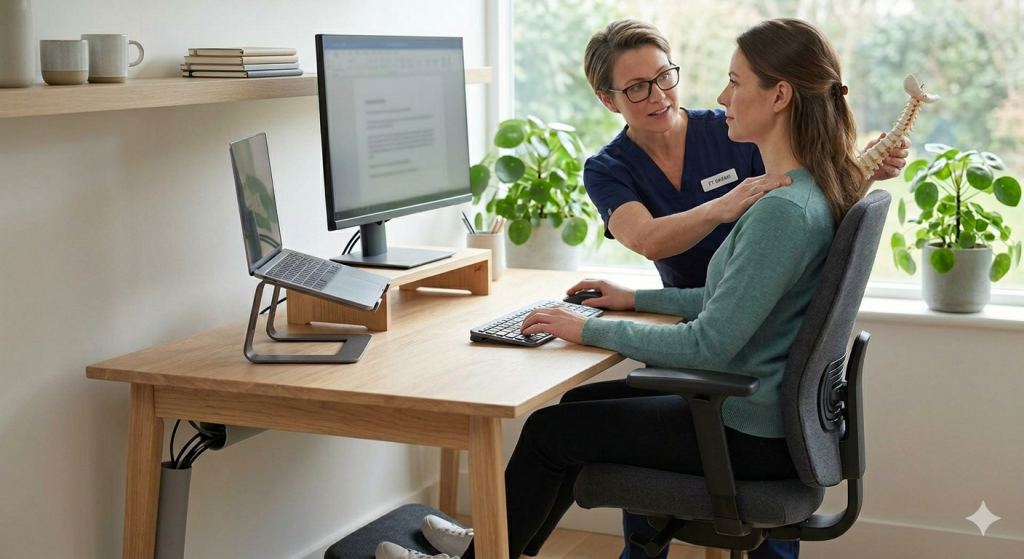
The modern workplace has undergone a radical transformation, shifting from corporate cubicles to home offices, kitchen tables, and even couches. While this flexibility offers convenience, it has also triggered a surge in repetitive strain injuries and chronic musculoskeletal pain. For researchers, students, and digital creators, the workspace is where the most significant physical toll is taken.
Setting up an ergonomic workspace is not just about buying an expensive chair; it is about understanding the biomechanics of the human body and creating an environment that supports natural alignment. Here is how to build a pain-free home office from the ground up.
1. The Foundation: Neutral Spine Alignment
The goal of ergonomics is to maintain a “neutral” posture, a position where the joints are naturally aligned, reducing stress and strain on the muscles, tendons, and skeletal system.
When you sit, your ears should be directly over your shoulders, and your shoulders should be over your hips. Any deviation from this such as leaning forward toward a monitor increases the load on your spinal discs. To achieve this, your chair must provide adequate lumbar support. If your current chair lacks a curve for your lower back, a rolled-up towel or a dedicated lumbar pillow can fill that gap, maintaining the natural inward curve of your lower spine. Learn more
2. The “90-90-90” Rule
A physical therapist’s gold standard for sitting posture is the 90-degree rule. To prevent nerve compression and maintain healthy circulation:
- Elbows: Your elbows should be bent at a 90-degree angle, with your forearms resting parallel to the floor. Your keyboard and mouse should be positioned so you don’t have to reach forward or upward.
- Hips: Your hips should be at a 90-degree angle relative to your torso.
- Knees: Your knees should be bent at a 90-degree angle, with a small gap between the back of your knees and the edge of the seat to prevent circulation issues.
If your chair is too high and your feet are dangling, use a footrest. Having your feet flat on a solid surface is essential for stabilizing the pelvis and reducing lower back pressure.
3. Monitor Height and the “Horizon” View
One of the most common causes of “Tech Neck” is an improperly positioned monitor. If your screen is too low, your head will naturally tilt forward, placing up to 60 pounds of pressure on your cervical spine.
The top third of your computer screen should be at eye level. When you look straight ahead, you should be looking at the top of the display. This ensures that your neck stays neutral. If you are using a laptop, it is physically impossible to have the keyboard and screen in the correct ergonomic positions simultaneously. The solution is to use a laptop stand (or a stack of books) to raise the screen and connect an external keyboard and mouse at desk level.
4. Strategic Keyboard and Mouse Placement
Wrist health is often overlooked until pain begins to radiate through the carpal tunnel. Your keyboard should be placed at a distance that allows your elbows to remain at your sides. Avoid “wrist extension”, the habit of tilting your hands upward to type. Your wrists should remain flat and neutral.
Similarly, your mouse should be kept close to the keyboard. Reaching far to the side for your mouse causes the shoulder to rotate externally, leading to strain in the rotator cuff and upper trapezius muscles over time.
5. The “Motion is Lotion” Philosophy
Even the most perfect ergonomic setup becomes harmful if you stay in it for too long. The human body is designed for movement, not static loading.
Implement the 20-8-2 rule: For every 30 minutes of work, spend 20 minutes sitting, 8 minutes standing, and 2 minutes moving or stretching. Use these two minutes to perform “Scapular Squeezes” (pinching your shoulder blades together) or “Chin Tucks” to reverse the effects of gravity and seated posture.
Read: The Silent Strain: How Digital Ergonomics Protects Your Spine in a Smartphone World
The Long-Term Benefit
Investing time in your workspace setup is an investment in your career longevity. By applying these physical therapy principles to your home office, you reduce the risk of tension headaches, sciatica, and chronic neck pain. Ergonomics is the bridge between high productivity and physical wellness ensuring that while you are busy building your professional future, you aren’t breaking your body in the process.